Time & Billing for Law Firms, from Solo to 100+

Billing your time, made easy. Including the hours you forgot to write down.

OnPoint is the affordable, easy-to-use time and billing app for attorneys. Capture an entry in seconds as the work happens, or connect your Outlook and let it suggest the entries you missed from your calendar and mail. Then send invoices your clients can pay online. Solo or a whole firm, $9.99 a month.

Free to start: your first entries are on us, no card. Then $9.99 a month per attorney, and non-billing administrators are free.

OnPoint on a computer: the five tabs down the left side, the capture card with client chips, hour buttons, Start Timer and a dictation button, and the day's entries as a table with client, matter, narrative and amount, totaling 7.5 hours and $2,457

One account on your phone, tablet and computer. Save an entry on one and it is on the others when you open them.

Everything a billing app should do, from the first day.

OnPoint captures the time, cleans up the words, builds the bill, tracks the money and, for a firm, runs the review. Here is the list.

At your desk

Real desk software in the browser. Nothing to install.

Open onpointtimeentry.com on any computer and you get the wide layout: the five tabs down the left side, capture next to your day as a table, and the money views a solo or a firm needs. Your phone uses the same account, so nothing is retyped.

Home on a computer: 7.5 hours today against the goal, 34.7 hours this week, $61,100 unbilled and $4,627 outstanding on 2 bills, and the latest entries
Home: today against your goal, the week, what is unbilled, what clients owe, and your latest entries.
The firm Review queue: entries from three timekeepers with approved and sent back badges, each with Approve and a menu for Edit, Send back, Reassign and History
OnPoint for Firms: the review queue. Approve, send back, edit or reassign, and every change is recorded.
The Summary on a computer: today, this week and this month up top, a week chart against the goal line, a month calendar with goal-met days filled in, and the year's monthly totals
Summary: today, the week, the month and the year against your goal.

Easy to use, easy on the budget, and it does a lot.

01

Capture it as it happens.

A mic sits beside the timer. Say what you did and it becomes an entry with the client, matter and hours filled in. Tap a tenth, run the timer, or type. Chain Dictation takes a whole afternoon in one sitting, and Polish turns rough words into clean billing language.

How capture works

02

Or reconstruct it from your email.

Forgot to log yesterday? Connect Outlook and OnPoint reads your calendar and your sent and received mail, then suggests the entries: the calls, the meetings, the correspondence, each with the client already matched. You approve them in a tap, and the AI writes each entry from the messages behind it. OnPoint stores nothing from your mailbox.

See the suggestions

03

A lot of app for $9.99.

Letterhead or Modern invoices in Word, PDF and Excel, with a Pay online link. Batch billing. An assistant you can talk to. Trust accounting with a three-way reconciliation. LEDES and QuickBooks exports. Six themes. And OnPoint for Firms, with shared clients and a review queue, at the same price per seat.

Everything, with screenshots

The feature tour

Every feature for tracking time and billing clients.

OnPoint for Firms

One bill per client, for the whole firm.

Invite your colleagues, capture against shared clients and matters, and review each other's time before it bills. On billing day, it creates a consolidated invoice for every client, and the firm emails each bill straight from the app.

  • Shared firm clients and matters: one client list for everyone
  • A review queue: approve, send back, or edit, with the number of approvals you choose
  • Consolidated invoices grouped by timekeeper, with per-matter subtotals and rates frozen at issue
  • Batch billing with email: the bills leave from the app, and none can go out twice by accident
  • Payments recorded as they arrive; unbilled totals by client
  • Rate cards per person, per tier, or per client, plus timekeeper summaries
  • Client trust ledgers by matter, applied on firm bills and reconciled each month, with every change logged by name

$9.99 per seat per month · 7-day free trial · non-billing administrators are free

Your account is already a practice of one. Invite by email from Settings, under People, and your colleagues are capturing in minutes.

Summary for the whole firm: hours logged, timekeepers, clients, and hours by timekeeper
The Review tab for a reviewer: the firm's entries, each with Approve and a menu for Edit, Send back, Reassign and History
Billing: every client with unbilled time and what it comes to, a Bill everyone button, and a client still waiting on review
Ready to bill, by client
Issued firm bills with Sent, Part paid, Paid and Overdue badges, View and Record payment on each, and Word, PDF and Excel under the more button
Issued, paid, tracked
A timekeeper summary for one person and period, exportable as Excel or PDF
Per-timekeeper summaries
The consolidated firm invoice: letterhead, timekeeper sections by initials with rates, per-matter subtotals, and Net 15 terms
The consolidated bill
How it works

Capture time your way, then bill it in minutes.

0.1

Capture it

Tap a tenth, run the timer, or type a line the moment work ends. Or talk the way you'd brief an assistant ("Johnson, one point seven, consultation re settlement agreement") and Chain Dictation lines up several entries at once.

0.2

AI structures it

The AI reads your words like a colleague would and fills in the client, the hours, the date, and a clean narrative. Nothing saves until you've looked it over and approved it. Your phone's own speech recognition does the listening; OnPoint never receives or stores audio. To structure an entry, the dictated text is sent along with your client and matter names so it can match them.

0.3

The bill goes out

Pick a period and export Word, PDF, or Excel in your invoice style. Or bill everyone at once: a numbered invoice for every client with unbilled work. On iPhone the share sheet opens with the files already attached; choose Mail, Gmail, or Outlook and send.

One sentence becomes a saved, billable entry.
The capture screen with the quick-mic bubble showing a spoken entry being transcribed live, below the client chips and the Start Timer button
The quick mic rides along on the capture screen: speak an entry without leaving the form.
Polish

Rough notes become clean billing language.

You wrote "Worked on the motion for summary judgment, and kept revising the statement of undisputed facts. Also emailed the paralegal about exhibits." Tap Polish and the AI rewrites it the way a seasoned biller would: Draft Motion for Summary Judgment; revise statement of undisputed facts; correspondence to paralegal re exhibits.

It knows the conventions clients expect on a legal bill: semicolons between tasks, "correspondence" instead of "email," a call is a "conference," and your dates kept exactly as you said them.

Polish rephrases. It never embellishes. It won't invent tasks, inflate verbs, or add names that weren't there, and if a note is too thin to rewrite honestly it says so instead of guessing. You stay in control: Accept the rewrite or keep yours, entry by entry.
Polish before-and-after card: the rough summary-judgment note above the polished semicolon-separated version, with Accept and Keep mine buttons
Before and after, side by side. You choose which one bills.
Watch a rough note become bill-ready. Nothing is added that was not said.
Connected accounts

Suggested entries from your calendar and mail.

Link your Outlook and OnPoint drafts entries from any day you pick: meetings from your calendar, threads from your mail, each with the date, a duration, and the client already matched. Save the ones that are right, edit the ones that are close, dismiss the rest. A day you forgot to capture comes back in a minute or two.

Read straight from your Microsoft account. OnPoint asks for read-only access and matches meetings and mail to your clients on your device. Nothing becomes an entry until you save it. When you save or use a mail suggestion, the AI writes the entry from the text of those messages. You can turn that off in Settings, under Connected accounts.
The Suggest entries sheet over the capture screen: a scanned day with suggestions from the calendar (Board meeting, Status conference) and from mail (Easement negotiation, Settlement redline), each with hours, a matched client, and Save, Edit, and dismiss buttons
One scan of a day: meetings and mail threads, matched to clients, one Save each.
The money view

See what is unbilled, by client.

Home shows what you have not billed and what clients still owe the moment you open the app. Billing lists every client with unbilled time and what it comes to. Overdue bills are flagged in red, and Remind drafts a courteous nudge for you.

When it is time to bill, OnPoint builds a numbered invoice for every client with unbilled work, saves each one to your records, and hands you the files.

Or skip the taps entirely: tell the assistant "Send ABC's latest bill." It names the bill and the amount first, and nothing goes out without your yes. For time that isn't billed yet, it opens the bill for you to issue.

Home: 6.9 hours today against a 6.5-hour goal, 34.8 hours this week, $18,691 unbilled and $4,924 outstanding on 3 bills, and the latest entries
What is unbilled and what clients owe, the moment you open the app.
"Send ABC's latest bill." The assistant names the bill and the amount, and nothing goes out until you say yes.
Trust accounting

A trust ledger for every client.

Every client gets a trust ledger, and every matter within a client gets its own. You record retainers coming in, payments going out, and the amounts applied to bills. Each amount is stored to the cent. OnPoint will not accept a transaction that would put a ledger below zero on any date, so one client's money can never be used for another client's matter.

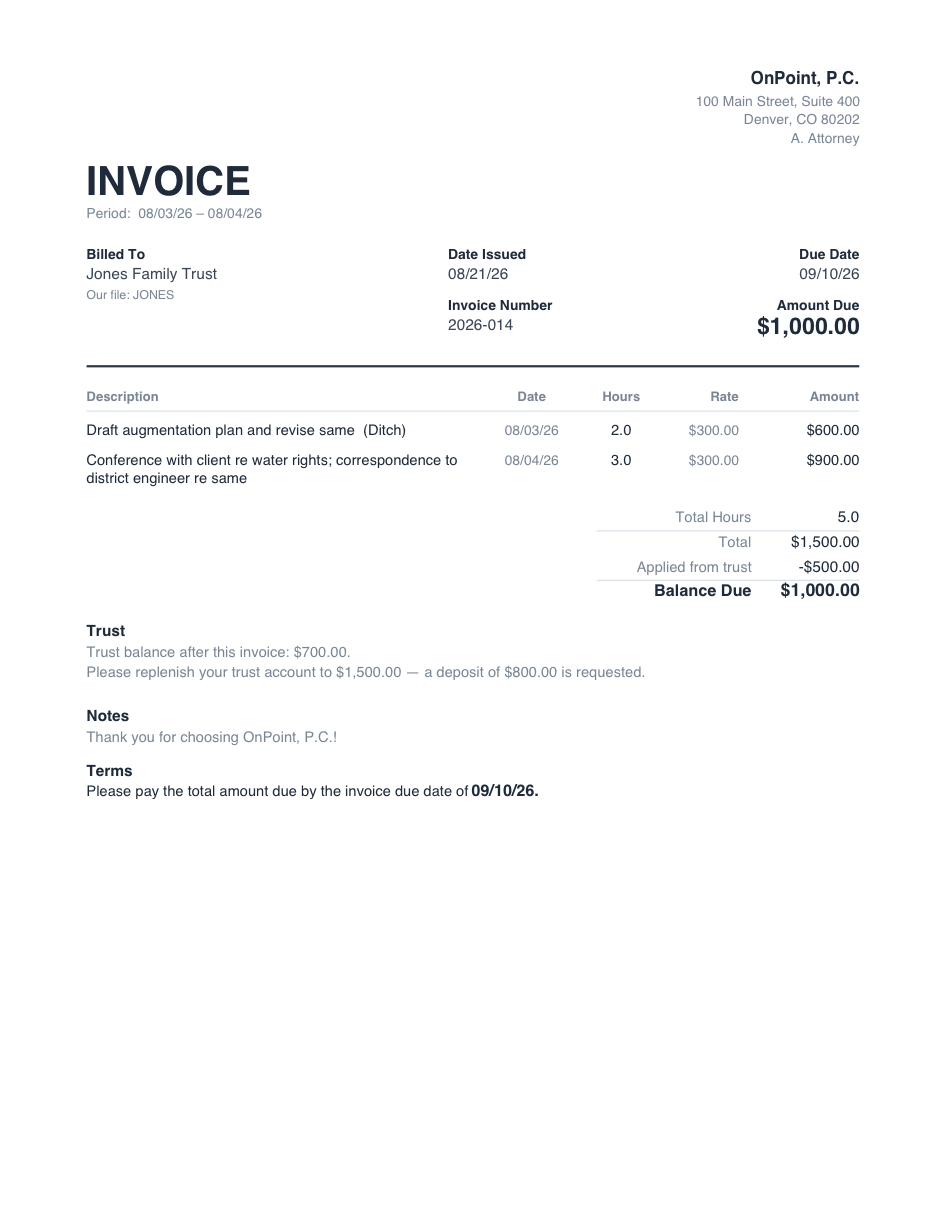
Bills show the trust activity: the amount applied from the retainer, the trust balance after that, and, if you have set a target for the client, a request to bring the balance back up to it. This prints on Word, PDF, and Excel, in both invoice styles.

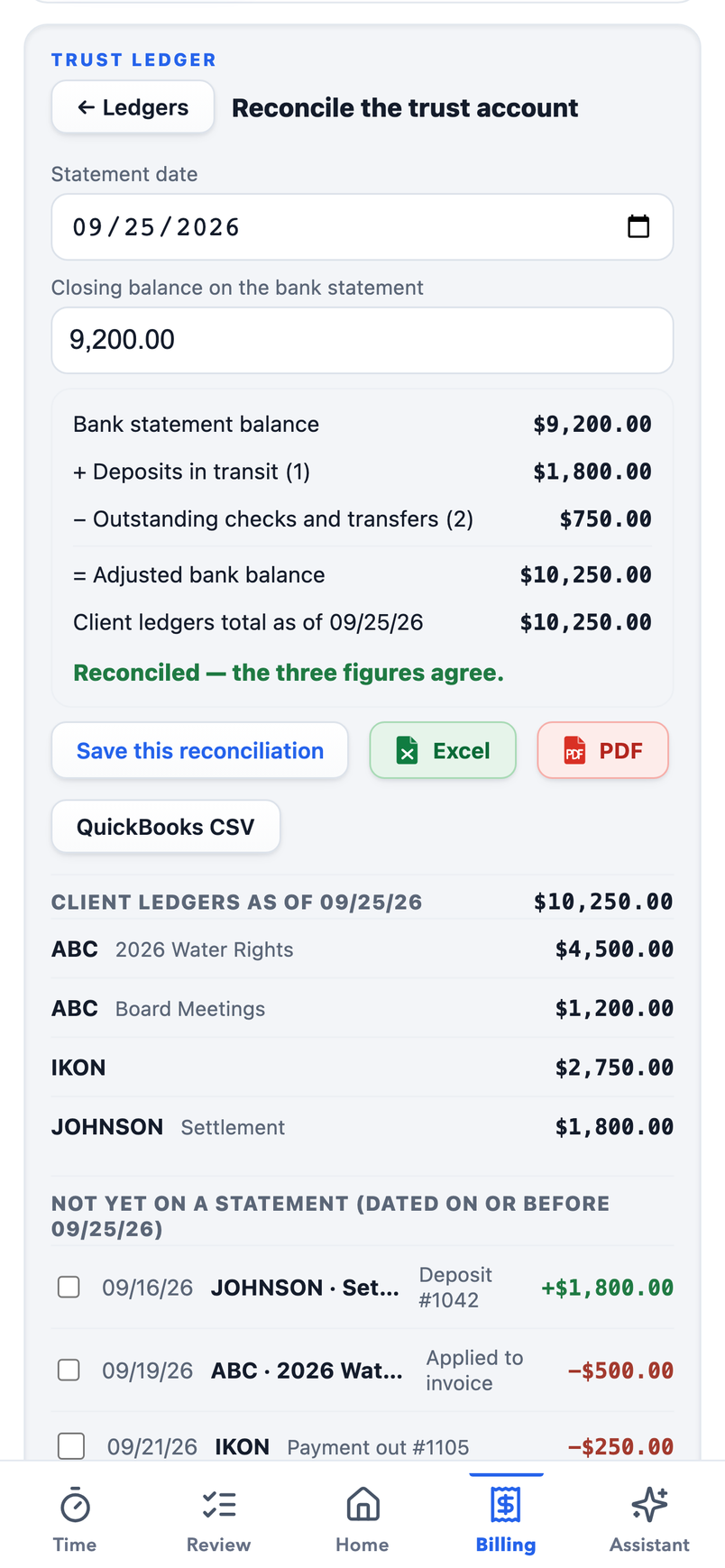
To reconcile, enter the closing balance from the bank statement. OnPoint shows the statement balance, the deposits and checks that have not cleared yet, and the total of the client ledgers, and tells you whether they agree or by how much they differ. Mark the items that cleared, save the reconciliation as a record, and export it to Excel or PDF. A QuickBooks CSV is included that posts trust transactions to a liability account, not to income.

OnPoint keeps the records. It does not connect to your bank and does not hold or move money. In a firm, the trust ledger belongs to the firm: administrators and reviewers record and reconcile it, and every change is logged with the name of the person who made it.

The reconciliation screen: statement date and closing balance, then bank statement balance plus deposits in transit minus outstanding checks equals the adjusted bank balance, compared with the client ledgers total, reading 'Reconciled, the three figures agree', with the client ledgers and the not-yet-cleared items listed below
The reconciliation screen: enter the statement balance, mark what cleared, save the record.
An OnPoint invoice whose totals read Total $1,500.00, Applied from trust -$500.00, Balance Due $1,000.00, followed by a Trust block: trust balance after this invoice $700.00, and a request to replenish the trust account to $1,500.00
A bill showing the amount applied from trust, the balance due, and the replenish request.
Billing day

Bills your clients take seriously.

Two styles, and every export follows the one you pick. Letterhead is the classic: your logo and firm block up top, black on white, the way bills have always looked. Modern puts the amount and due date up front, with your logo in the corner and fees and costs totaled below. Word, PDF, and Excel alike.

Pay online, through your own link. Paste the payment page you already use (LawPay, a Stripe payment link, your bank's portal) into Settings once, and every bill carries a clickable "Pay online" line: both styles, PDF and Word, and Excel. OnPoint prints your link and your client pays you there. The money never passes through us.

And the whole run happens at once. Batch billing builds a numbered invoice for every client with unbilled work: files ready to send, records saved, nothing retyped. Firms go one further and email each client's bill straight from the app; every address is shown before anything sends, and no bill can go out twice by accident.

A Letterhead-style OnPoint invoice: logo and firm block at top, billed-to details, itemized entries with dates, hours, rate and amounts, and balance due
Letterhead: the classic. Your logo and firm block, black on white.
A Modern-style OnPoint invoice: the firm's logo top right, invoice number and dates, the amount due up front with a blue Pay online link, itemized fees, a costs section, and totals
Modern: amount and due date up front, with the Pay online link.

Both are actual OnPoint exports, untouched. Billing everyone at once makes one bill per client, each with its own invoice number. If a carrier requires LEDES 1998B, OnPoint produces the file. A QuickBooks CSV is available too. On iPhone, the share sheet opens with the files attached.

Keeping score

The year, at a glance.

Set a daily goal and the Summary keeps score: today against the goal, the week as bars, the year as a grid of months that fill in when you hit it. Clear a day and the app quietly celebrates; string a few together and it counts the streak.

It also projects where the year lands at your current pace, so you know in August whether you're on track.

Summary, under Review: goal met today at 106%, week bars against a dashed goal line with a 5-day goal streak, and the 2026 year grid with goal-met months filled in and a year-end pace projection
Goal streaks, filled-in months, and where the year is heading.
Themes

Six themes. Bills stay black on white.

Studio is the default, in white or Midnight, its dark shade. Professional for the office, pastel for a softer desk, beach for daylight, dark for late nights, stealth for keeping a low profile. The theme is for your screen, never the client's: exported bills stay black on white, in whichever invoice style you chose.

The capture screen in the Studio theme: white, with the entry in a recessed tray and a blue Save Entry button
Studio
The capture screen in Studio’s Midnight shade: near-black, with the same tray and a blue Save Entry button
Studio · Midnight
The capture screen in the professional theme: navy leather background with white cards
Professional
The capture screen in the pastel theme: warm birch background with rainbow accents
Pastel
The capture screen in the beach theme: sandy light background with ocean-blue accents
Beach
The capture screen in the dark theme: near-black background with neon accents
Dark
The capture screen in the stealth theme: matte near-black background with muted controls
Stealth
Confidentiality, by design

Your clients' business stays yours.

OnPoint keeps your entries on your device. The app works fully offline, and when you sign in they sync privately to your own account, so a lost phone never means lost work. Dictation is handled by your phone's own speech recognition: OnPoint never records, stores, or transmits audio.

The AI features send the text you dictate or type, or the messages behind a mail suggestion you save or use, together with your client and matter names so they can match them. The app shows no ads. It measures what happens, such as an entry saved or a bill exported, never what you wrote. Your work is never sold or shared. You can put the whole app behind Face ID.

ON YOUR DEVICE FIRST
WORKS OFFLINE
NO AUDIO STORED
YOUR OWN ACCOUNT
FACE ID LOCK

Read the privacy policy. The plain-English version is at the top.

OnPoint's lock screen: the OnPoint mark with 'Unlock with Face ID' and an Unlock button on a dark background
Pricing

$9.99 a month, or $99 a year.

Monthly

$9.99/month

Every feature. Cancel anytime.

Start monthly
Best value

Yearly

$99.00/year

Save about 17%: two months free.

Start yearly

Try it free first: no card, and your first entries are on us. When you're ready, pick your plan in the app: 7-day free trial, cancel anytime. Checkout through Lemon Squeezy on the web, or through the App Store on iPhone and Google Play on Android. One subscription covers one attorney; a firm pays $9.99 per seat per month and non-billing administrators are free.

Your entries and bills are yours. Nothing you type is sent to an advertising or analytics service. Privacy Policy.

FAQ

Common questions.

Where is my data stored?

On your device first, so it's instant and works with no signal. Once you sign in, it syncs privately to your own account in an encrypted cloud database, backed up and available on every device you use. Access is limited to your account; we don't sell your data, and nothing you type is ever sent to an advertising or analytics service. Full details are in our Privacy Policy.

How does the voice capture work?

Tap the mic and speak naturally: "point three for Johnson, call re the settlement." OnPoint picks out the client, hours, date, and narrative and shows them for you to confirm before anything is saved. Dictation runs through your phone's built-in speech recognition, the same one you use to text, so OnPoint receives only the finished text and never records or stores audio.

What does the AI see?

Five features use AI: dictation (the quick mic and Chain Dictation, structuring what you say into entries), Polish (rewriting a narrative), the Assistant, mail suggestions, and the import screen (column headings only). Each request sends the text you dictated or typed, along with your client and matter names so the AI can match them. It never receives audio. When you save or use a suggestion from your mail, the AI writes the entry from the text of those messages; you can turn that off in Settings, under Connected accounts. The full list of what each feature sends is in the Privacy Policy.

Does OnPoint handle trust accounting?

Yes. Each client has a trust ledger, divided by matter. OnPoint records deposits, payments out, and amounts applied to bills, and it will not accept a transaction that would take a ledger below zero. Bills show the amount applied and the balance after it. Each month you can reconcile against your bank statement: OnPoint compares the statement balance, the uncleared items, and the client ledgers, and saves the result as a record. You can export to Excel, PDF, or a QuickBooks CSV. OnPoint does not connect to your bank and does not hold or move money.

What happens if I switch phones or clear my browser?

Sign in on the new device and your work syncs down automatically. You can also keep a manual backup: Settings → Your data → Download backup gives you a file you control, and Restore loads it anywhere.

Is it on the App Store and Google Play?

Yes: OnPoint Time & Billing on the App Store and on Google Play for Android. You can also install it straight from your browser: open the app in Safari (or Chrome on Android), tap Share, then "Add to Home Screen." Both use the same account, so your time is on whichever you open.

Can I try it before paying anything?

Yes. Download it from the App Store or Google Play, or open onpointtimeentry.com/app in your browser, create a free account, and start capturing. There's no card and no time limit: your first 7 saved entries and 10 AI actions are free, however long they take you. When you're ready to send a bill, the 7-day free trial unlocks exports and everything else. And if OnPoint isn't for you, your entries stay viewable and you can always download a backup of your own data.

Does it replace my billing software?

It can feed it or replace it, your call. Export Excel, LEDES or a QuickBooks file for the billing system you already run, or use OnPoint as the billing system: it numbers the invoices, builds the Word, PDF, or Excel files, prints your Pay online link, and tracks what's sent, paid, and overdue.

Can my clients pay me through OnPoint?

They pay you through your own payment page. Paste the link you already use (LawPay, a Stripe payment link, your bank's portal) into Settings once, and every bill prints it as a clickable "Pay online" line. Your client pays you there directly: OnPoint never processes, holds, or even sees the money, and takes no cut. Leave the link blank and bills simply print without the line.

Can my whole firm use it?

Yes, that's OnPoint for Firms. Everyone captures into a shared client list; the time is reviewed and approved by as many people as you decide, from nobody to three; and the firm issues one consolidated bill per client on its own letterhead, grouped by timekeeper with each person's rate. On billing day it can issue every client's bill in one pass and email each one straight from the app; every address is confirmed first, and a bill can't be emailed twice by accident. It also tracks payments, including partial ones. It's $9.99 per billing seat per month with a 7-day free trial, and non-billing administrators are free. There is nothing to set up: your account is already a practice of one, and inviting a colleague from Settings, under People, is what makes it a firm.

Can I cancel? What's the refund policy?

You can cancel anytime; your subscription simply won't renew, and you keep access through the period you've paid for. Not sure whether OnPoint fits your practice? Email support@onpointtimeentry.com before you subscribe. We are happy to answer anything.